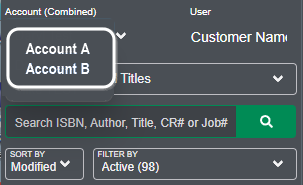
Note - It's crucial for users with access to multiple accounts to be aware of which account they are currently using to ensure that titles are created in the correct one.
Here’s how it works:
Once you have logged into Lakeside Scout, you can quickly switch between accounts with just a single click.
The account name you are currently active in will be displayed in the upper-left corner.
Clicking the account name drop-down menu will display all the accounts you have access to.
Simply click on the account you want to switch to.