IMPORTANT: This information is for visual reference only. There is no linking or direct commonality between the recorded ISBNs within Lakeside Scout. Making a correction in one title will not automatically make the correction in the other title.
Listing other possible common ISBNs will help inform the users that when making a correction to one title it may need replaced in other common titles. Corrections to other common titles must be managed by the user and made to each additional common version.
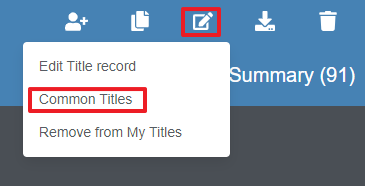
This tool allows the user to review, add or remove titles that are common with the current title. To begin, choose the icon with the pencil and paper icon from the upper-right corner of the title banner. Then, click on 'Common Titles' to display a popup window for this information.
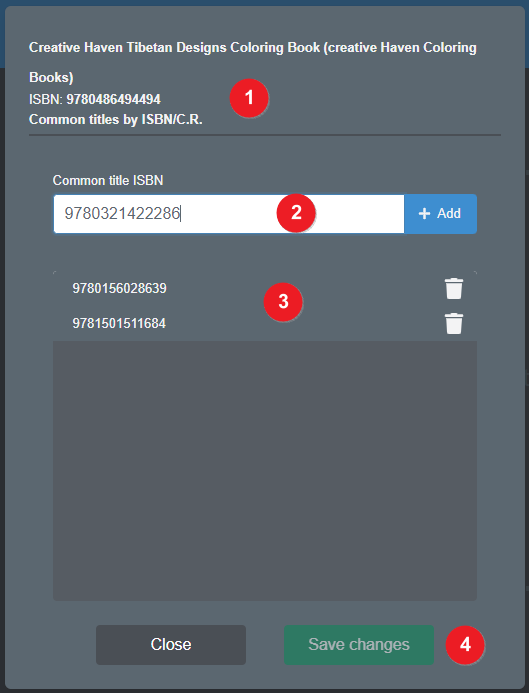
This area shows information about the current title being viewed.
This area is where the user enters an ISBN that is to be associated with this current title. Click the + Add button to add it.
This area shows a list of ISBNs that are already associated with the title. Click the trash can icon to remove its association. (NOTE: this does not alter or remove that title from Lakeside Scout, it only removes it from this associated ISBN list)
Click the Save changes button to save the addition(s) or removal(s) of associated ISBNs.